Create from text
Dream it, create it
Describe anything — a dreamy pastel bedroom with fairy lights, a kawaii café, a castle at sunset — pick a style and Aybuke turns your words into art. New results “develop” like an instant photo.
Updated 14 October 2026
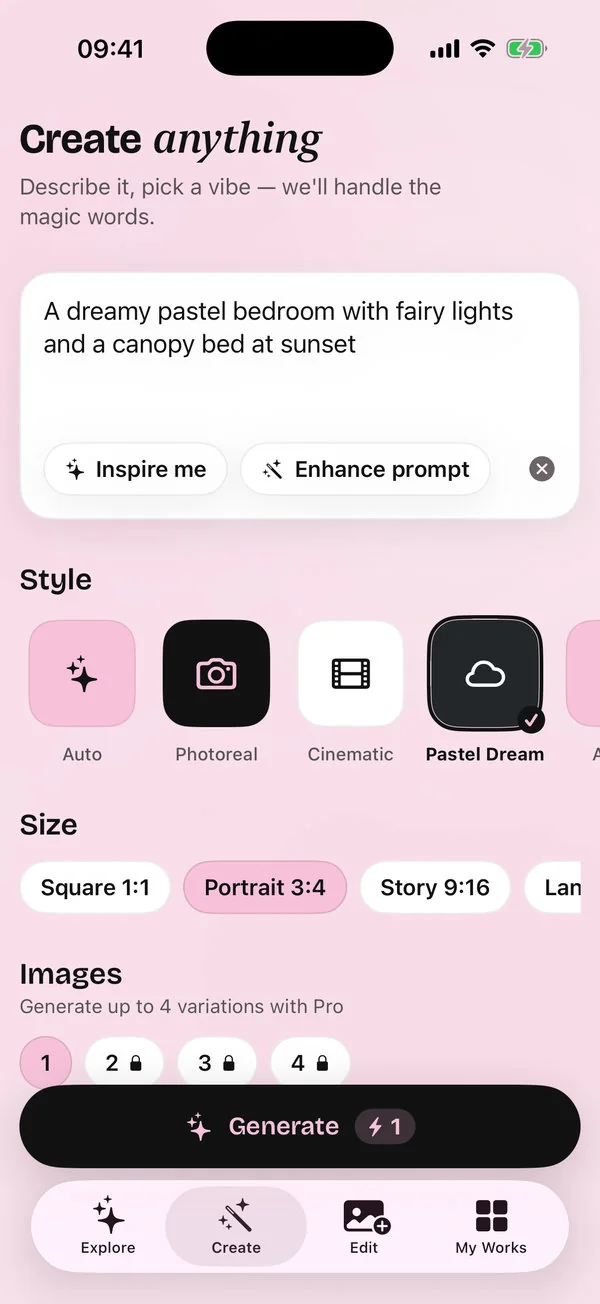
Create from text is Aybuke's AI image generator. You describe an idea, choose one of 20 styles and a size, and Aybuke makes the picture — ready for your Story, your wallpaper or your mood board.
How to create an image
Describe your idea
Open Create and type what you imagine. Stuck? Tap Inspire me for ideas, or Make it magic to add detail (Enhance prompt on devices without Apple Intelligence). Your recent prompts stay one tap away.
Pick a style
Choose from 20 styles such as Pastel Dream, Kawaii, Watercolor, Sticker or Diorama — or leave it on Auto.
Pick a size
Square, Portrait, Story 9:16, Landscape or Wide. With Pro, make up to 4 images at once.
Generate
Each image uses 1 credit. Your result develops like an instant photo, and failed generations are refunded.
Save, share or edit
Save it (or Save all), share it, or open it in the editor to keep going with Magic Edit and effects. Regenerate makes a new take; it asks first, as it uses credits again.
The 20 styles
| Style | Great for | Plan |
|---|---|---|
| Photoreal | Natural, camera-like pictures | Free plan |
| Cinematic | Movie-still light and mood | Free plan |
| Pastel Dream | Soft pinks and lilacs | Free plan |
| Anime | Hand-drawn animation looks | Free plan |
| Kawaii | Cute, round and playful | Free plan |
| 3D Toon | Animated-movie characters | Free plan |
| Fantasy | Castles, fairies and magic | Pro |
| Watercolor | Soft painted washes | Free plan |
| Oil Paint | Rich, textured paintings | Pro |
| Neon Noir | Glowing night scenes | Pro |
| Sketch | Pencil drawings | Free plan |
| Pixel Art | Retro game graphics | Free plan |
| Claymation | Stop-motion clay figures | Pro |
| Vintage Film | Faded film photos | Free plan |
| Sticker | Die-cut stickers with a white border | Free plan |
| Storybook | Cozy picture-book illustrations | Free plan |
| Pop Art | Bold colours, halftone dots and thick outlines | Free plan |
| Cozy Knit | Knitted and crocheted yarn craft | Pro |
| Paper Craft | Layered paper cut-outs | Pro |
| Diorama | Tiny handmade worlds in miniature | Free plan |
Write better prompts
The best prompts name a subject, a setting, the light and a mood. Compare:
A bedroom
Too vague — you'll get something generic.A dreamy pastel bedroom with fairy lights and a canopy bed at sunset
Subject, details, light and mood: much better.A tiny kawaii bakery on a rainy street, warm window light, cozy
Pair it with the Kawaii style.
Tap Inspire me for ideas. On devices with Apple Intelligence, Make it magic rewrites your prompt with more detail. Both work right on your device. More tips in our prompt guide.
Create with Image Playground
On supported devices, Create also offers Create with Image Playground, Apple's own image maker. It's Apple's feature, so Aybuke's credits don't apply; Aybuke only receives the finished picture, which stays in your library on your device.
Labelled, like it should be
Every AI image you export carries an invisible “made with AI” label in its metadata, and the share screen can add an optional visible AI-edited label too. Read more about safety and privacy.
FAQ
Create, answered
Is the AI image generator free?
Each image uses 1 AI credit, and you get 2 free credits every day. With Aybuke Pro you get 80 credits a month and can make up to 4 images at once.
Which sizes can I make?
Five: Square 1:1, Portrait 3:4, Story 9:16, Landscape 4:3 and Wide 16:9.
Which styles are free?
14 of the 20 styles are on the free plan. Fantasy, Oil Paint, Neon Noir, Claymation, Cozy Knit and Paper Craft come with Aybuke Pro.
What are Inspire me and Make it magic?
Inspire me suggests ideas for your next image. On devices with Apple Intelligence, the ideas are written on your device, and Make it magic writes a more detailed prompt from yours; other devices get Enhance prompt instead.
Are AI images labelled?
Yes. Every exported AI image carries invisible “made with AI” metadata, and you can add a visible AI-edited label when you share.
Get ready to glow
Aybuke is made for iPhone, iPad and Mac. Want early access? Email us and we'll get back to you.
Email for early access